Smart Add
The technology supports changes of focus between different working distances and the use of multiple screens.
A focus on intermediate vision
DFZ15 and Smart Add for wearers who frequently move between different working distances.

High Experience PRO combines FreeForm design and Digital Ray Path with Surface Power and Conversion As-Worn Powers technologies. This combination aims to connect the visual fields and reduce lateral and peripheral aberrations.
Smart Add supports changes in focus between different working distances, particularly when daily life involves multiple digital screens. The design is intended for wearers with greater demands on distance, intermediate and near vision.
Design & use
The technology supports changes of focus between different working distances and the use of multiple screens.
Digital FreeForm processing of the back surface shapes the visual zones and the transitions between them.
A soft design version is also available as an additional option within the same design family.
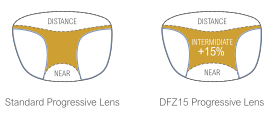
DFZ15 · Visual-field distribution
The DFZ15 protocol expands the intermediate area by 15%, improving its functionality without compromising the other lens zones.
A conventional progressive design is shown on the left and DFZ15 on the right. The coloured area lies between distance and near vision and illustrates the difference in the intermediate zone.
Technical specifications
The specifications apply to this particular design. Material and coating options are matched to the prescription requirements.